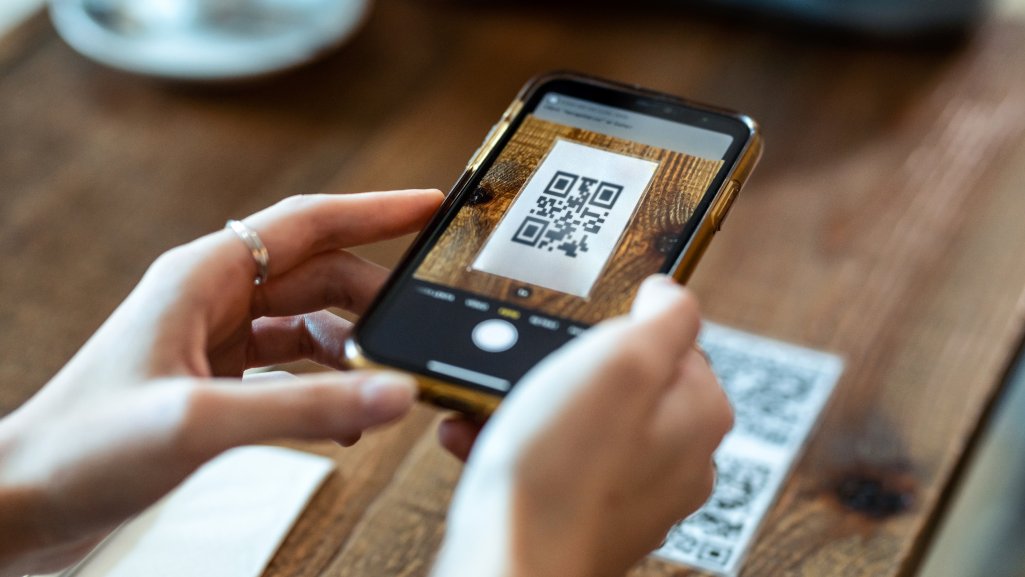
QR codes are convenient precisely because they skip a step — you don’t have to type out a web address, search for a business by name, or manually enter Wi-Fi credentials. That same convenience is exactly what scammers have learned to exploit. A QR code hides its destination until after it’s already been scanned, and that brief moment of blind trust is where a whole category of scams, sometimes called “quishing” (QR phishing), has taken root. Here’s how the scams actually work, and how to keep the convenience of QR codes without falling for the tricks built around them.
Why QR Codes Are an Easy Target
A QR code is nothing more than a container for data — usually a link, sometimes plain text, contact details, or Wi-Fi credentials. Unlike a typed-out web address, you can’t glance at a printed QR code and have any idea where it actually leads. That opacity is the entire appeal for scammers: they can generate a code pointing to a phishing page, print it on a sticker, and place it directly over a legitimate code in a public space, and almost nobody will notice the swap until it’s too late.
This has shown up in very concrete, reported incidents: fake stickers placed over legitimate codes on parking meters, directing drivers to fraudulent payment pages that collect card details; QR codes on fake parking tickets left on windshields; codes embedded in unsolicited emails claiming to be from a delivery service, a bank, or a government agency; and even QR codes printed on fake flyers claiming to offer free Wi-Fi or a giveaway prize. None of these require any technical sophistication from the scammer — just a sticker, a printer, and a public location where people are in a hurry.
How a QR Code Scam Usually Plays Out
Most QR code scams follow a similar pattern, regardless of the specific setting:
- A fake or altered code is placed somewhere a legitimate one would normally be — a parking meter, a restaurant table, a delivery notice
- Scanning it opens a page designed to look like a real login, payment, or verification screen
- The page asks for something sensitive right away — a password, card number, or personal ID details
- Because the whole interaction happens on a small mobile screen, subtle signs of a fake page — a slightly wrong domain name, a missing security certificate, awkward formatting — are much easier to miss than they would be on a desktop browser
Red Flags to Watch For
- A sticker that looks slightly out of place, peeling at the edges, or layered over another code
- QR codes arriving in unsolicited mail, emails, or texts you weren’t expecting, especially urgent ones
- A scanned link that asks for a password, payment details, or personal information immediately, with no other content on the page
- A shortened or unfamiliar-looking URL after scanning, rather than a recognizable business domain
- Urgent or threatening language on the destination page — “account suspended,” “payment overdue,” “act within 24 hours”
- A request to download an app or install a profile immediately after scanning
How to Scan More Safely
The single most useful habit is simple: check the decoded link or text before doing anything with it. A good browser-based scanner will show you exactly what a code contains — the full destination URL, a block of text, or a set of Wi-Fi credentials — before automatically opening or acting on anything. That preview is your chance to catch a mismatched domain, a suspicious shortened link, or oddly formatted text before it can do any damage.
This is also a good reason to scan QR code without app installs whenever possible, rather than relying on a random third-party scanner app downloaded specifically for one code. A browser-based tool avoids the extra step of trusting an unfamiliar app with camera or storage permissions in the first place — it simply reads the code, shows you what’s inside, and lets you decide, with nothing installed and nothing left behind on your device afterward.
Extra Caution in Public, Unattended Spaces
Codes found in places anyone could tamper with — parking meters, community bulletin boards, event flyers taped to a pole, or a table at a busy food court — carry meaningfully more risk than codes handed to you directly by a person you trust, or printed as part of official packaging from a manufacturer. If a code is on a surface accessible to the general public and unsupervised, treat it with the same skepticism you’d apply to a USB drive found in a parking lot: useful in theory, but worth a moment of caution before you act on it.
A few extra habits worth building:
- Look closely at the physical code itself for signs of a sticker placed over another one — a slightly different texture, color, or alignment is a giveaway
- Avoid entering payment information immediately after scanning a code in public; if a parking meter or vendor genuinely requires payment, there’s almost always an alternative method (an app you already have, a phone number, or a physical payment slot)
- Be extra cautious with codes that arrive digitally — in an email, a text message, or a social media DM — since these bypass any physical placement entirely and are trivial to mass-distribute
For Businesses: Protecting Customers From Spoofed Codes
If your business uses QR codes for menus, payments, or check-ins, you carry some responsibility for making sure customers aren’t scanning a tampered code. A few practical steps:
- Periodically inspect printed codes in your location for signs of stickers or overlays placed on top of the original
- Use dynamic QR codes where possible, so a compromised physical code can be quickly deactivated or redirected if you catch a problem
- Avoid placing codes on removable surfaces (like a loose paper sign) where an overlay sticker is easy to apply unnoticed — consider laminated or permanently affixed signage instead
- Make it easy for customers to reach your business by a non-QR method too, so a suspicious code isn’t the only way to complete a transaction
What to Do If You Scan a Suspicious Code
- Don’t enter any personal information, passwords, or payment details on the page that opens
- Close the page immediately, and if the code was on a payment terminal, parking meter, or public device, report it to the venue, vendor, or local authority
- If you already entered sensitive information before realizing something was wrong, change the affected passwords right away and monitor the relevant accounts or cards for unusual activity
- Consider reporting the incident to your country’s consumer protection or cybercrime reporting body, since these reports help track and remove active scam campaigns
Who Scammers Tend to Target
Quishing campaigns aren’t evenly distributed — certain settings and certain moments make people meaningfully more likely to scan without thinking. Parking situations are a classic example: someone standing at a meter, slightly stressed about a ticket, in a hurry to get to an appointment, is far less likely to scrutinize a sticker than they would be sitting calmly at home. Similar dynamics show up around deliveries — a text claiming a package couldn’t be delivered, with a QR code to “reschedule,” plays on urgency and the very reasonable assumption that a delivery company might text you. Corporate settings have seen a rise too, with fake internal codes claiming to link to a benefits portal or an HR form, since employees are conditioned to trust anything that looks like it came from their own company.
The common thread across all of these is urgency combined with a plausible, everyday context. Scammers aren’t relying on people being careless in general — they’re relying on a specific moment where a normally cautious person is distracted, rushed, or primed to trust the setting they’re in. Recognizing that pattern is often more useful than memorizing any specific list of red flags, because new variations on the same trick appear constantly.
Building the Habit Long-Term
Security habits that require constant vigilance tend to fail over time, simply because nobody sustains high alertness indefinitely. The habits that actually stick are the low-effort ones — previewing a decoded link before opening it takes about two extra seconds, which is a cost most people will actually pay consistently, unlike, say, researching a business before every single scan. Building that one small pause into how you use QR codes, rather than trying to memorize every scam variant, is the most realistic long-term defense.
The Bigger Picture
QR codes themselves aren’t dangerous — the format is just a delivery mechanism, in the same way a hyperlink or a phone number is. The actual risk comes entirely from not knowing where a code leads before you follow it, and from acting too quickly on whatever appears immediately after a scan. That’s a solvable problem, not an inherent flaw in the technology.
A simple habit of previewing decoded content before opening it, staying alert around codes in unattended public spaces, and treating an unexpected code with the same healthy skepticism you’d apply to an unexpected email link will handle the overwhelming majority of QR-based scams. The technology isn’t going anywhere — used carefully, it remains one of the fastest and most convenient ways to move information from the physical world into your hands.